
Portable Power Station Buying Guide (2026): What to Check Before You Buy

Buying a portable power station is easy to get wrong in two ways: you either buy too little capacity (it doesn’t last long), or you buy too little power (it can’t run the devices you actually care about). Specs can also be misleading—fast-charging claims, “peak watts” marketing, and solar compatibility issues trip up a lot of buyers.
This 2026 buying guide walks you through the checks that matter most: capacity (Wh), output power (W), battery type (LFP vs NMC), ports, charging speed (AC/car/solar), solar connectors and voltage range, portability, safety, warranty, and long-term cost. At the end, you’ll find a copy-paste checklist and three simple buyer profiles.
Portable Power Station Capacity (Wh) Explained
What is Wh (watt-hours) and why it matters
Wh (watt-hours) = how much energy the battery can store. Think of it as the size of the “fuel tank.” Higher Wh usually means longer runtime.
A practical way to think about common sizes:
- 200–300Wh: light trips, basic emergency power (phones, camera batteries, router, lights)
- 500–1000Wh: camping and short outages (the most common range)
- 1500–2500Wh+: home backup use cases (heavier, pricier, but more capable)
Wh answers the question: “How long will it run?”
It does not tell you whether the unit can start or run high-power devices—that’s watts (W).
How to estimate runtime (simple formula)
Use this quick formula:
Runtime (hours) ≈ Usable capacity (Wh) ÷ Device power draw (W)
Most people plug in the advertised Wh, but real usable energy is lower due to conversion losses. A better real-world estimate:
Runtime ≈ (Rated Wh × 0.8 to 0.9) ÷ Load (W)
- If you mainly use AC outlets, use 0.8 (more inverter loss).
- If you mainly use USB/12V DC outputs, use 0.9 (typically more efficient).
Real usable capacity (efficiency loss)
Rated capacity is not the same as what you can actually use. Losses come from:
- Inverter conversion losses (DC battery → AC power)
- System overhead (BMS, display, cooling fan)
- Variable loads (appliances cycling on/off)
- Temperature (cold weather reduces usable energy and may limit charging)
A simple rule of thumb:
- Use Usable Wh = Rated Wh × 0.85 for general planning.
- Use 0.8 for heavy AC usage.
- Use 0.9 for mostly DC/USB usage.
Quick sizing examples (300Wh / 600Wh / 1000Wh / 2000Wh)
These examples help you avoid underbuying:
300Wh
- Laptop at 60W (USB-C PD): 300 × 0.9 ÷ 60 ≈ 4.5 hours
- Router at 10W: 300 × 0.9 ÷ 10 ≈ 27 hours
600Wh
- LED lights at 20W: 600 × 0.85 ÷ 20 ≈ 25 hours
- Fan at 40W: 600 × 0.85 ÷ 40 ≈ 12.7 hours
1000Wh
- 12V fridge averaging 60W: 1000 × 0.85 ÷ 60 ≈ 14 hours
- TV at 100W: 1000 × 0.85 ÷ 100 ≈ 8.5 hours
2000Wh
- Refrigerator averaging 150W: 2000 × 0.8 ÷ 150 ≈ 10.6 hours (rough estimate; fridges cycle and have surge)
- Router (10W) + lights (20W) = 30W: 2000 × 0.85 ÷ 30 ≈ 56 hours
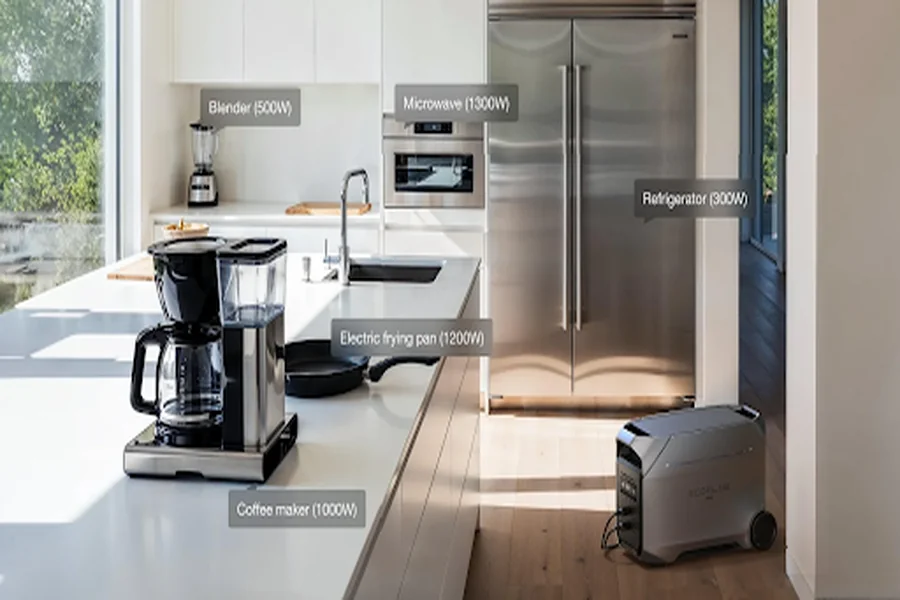
Portable Power Station Watts (W) Explained
Continuous watts vs surge watts
Portable power stations typically list two watt numbers:
- Continuous watts (running watts): what it can output steadily.
- Surge/peak watts: short bursts for startup loads.
Continuous watts matter most for what you can reliably run. Surge watts matter for starting motor-driven appliances.
What devices need surge power (fridge, pumps, power tools)
Surge power is most important for devices with motors or compressors, such as:
- Refrigerators / freezers
- Water pumps / sump pumps
- Air compressors
- Many power tools (especially high-torque tools)
Rule of thumb: if it has a motor or compressor, don’t rely only on the “average watts” label—startup surge is the common failure point.
Inverter rating vs “peak marketing numbers”
Common spec pitfalls:
- Advertising a huge peak number while hiding the continuous rating
- Adding up multiple ports’ output as if they can all run at full power simultaneously
- Claiming fast performance based on very short peak bursts
Always confirm:
- AC continuous output (W)
- AC surge output (W) and whether the surge is meaningful (not just milliseconds)
How to avoid overload shutoff
Overload shutoffs are annoying and preventable:
- Keep at least 20% headroom under the continuous watt rating.
- For motor appliances, make sure surge capacity is adequate.
- Add up total watts if running multiple devices on AC.
- Be cautious with heating appliances (kettles, hair dryers, hot plates). They often demand high continuous watts and quickly exceed smaller units.
LFP vs NMC Battery Chemistry (Which One to Buy)
Cycle life comparison (what “cycles” means)
A “cycle” generally means using the battery’s total capacity once (100% → 0% → 100%), or an equivalent amount over partial discharges. Brands may measure “end of life” differently, so treat cycle numbers as directional.
In general:
- LFP (LiFePO₄): longer cycle life, often better for frequent use.
- NMC: higher energy density, often lighter and smaller for the same Wh.
Weight and size trade-off
If you carry your power station often, weight matters:
- NMC is typically more compact and lighter at the same capacity.
- LFP is typically heavier but geared toward long-term durability.
Temperature performance and storage
Temperature affects both performance and longevity:
- Cold conditions reduce usable energy and may restrict charging/discharging.
- Long-term storage is usually best at a partial charge (not full, not empty).
- If you’re buying for “emergency backup and rarely use it,” storage behavior matters.
Who should choose LFP vs who should choose NMC
A simple decision rule:
- Choose LFP if you’ll use it often (camping every month, regular jobsite use, frequent outages) and want long-term value.
- Choose NMC if portability is your top priority and you’ll use it less frequently.
Ports and Outputs Checklist (AC / USB-C / 12V)
How many AC outlets do you really need
Outlet count matters less than total AC output. Ask:
- How many AC devices will you run at the same time?
- What’s the total wattage of those devices?
Typical guidance:
- 1–2 outlets: light camping and charging
- 2–4 outlets: more flexible home and travel use
USB-C PD wattage (65W/100W/140W) for laptops
USB-C PD is a major quality-of-life feature:
- 65W PD: often fine for ultrabooks
- 100W PD: best “covers most laptops” choice
- 140W PD: for higher-power devices (if your laptop supports it)
Check whether the PD wattage is per port or shared across ports.
12V output: regulated vs cigarette-lighter style
12V outputs come in different behaviors:
- Regulated 12V: more stable and often better for fridges and sensitive 12V gear.
- Cigarette-lighter style: common and convenient, but sometimes less stable depending on design.
If you plan to run a 12V fridge, regulated 12V output can be a meaningful advantage.
Pass-through charging (can you charge and use at the same time)
Pass-through (charging while powering devices) is important for:
- home backup setups
- long trips where you’re topping up while using the unit
Even when supported, pass-through may increase fan noise and heat during high loads.
Charging Options and Charging Speed (AC / Car / Solar)
AC charging wattage and typical charge time
Charging speed is mostly about AC input watts.
A simple estimate:
Charge time ≈ Capacity (Wh) ÷ AC input (W) (then add loss overhead)
For example, a 1000Wh unit:
- 200W input → ~5+ hours
- 500W input → ~2+ hours
- 1000W input → ~1–1.5 hours (depending on charging curve)
Car charging limits (why it’s slower than expected)
Car charging is usually slower because:
- 12V ports have limited power
- vehicle systems limit current
- many stations cap car input to protect batteries
Car charging is best viewed as “driving-time top-up,” not a fast way to fully recharge.
Solar charging basics: MPPT, input voltage range, panel wattage
Solar charging depends on:
- MPPT controller (more efficient and generally preferred)
- Solar input voltage range (must match your panel setup)
- Panel wattage (real output varies with sun angle, temperature, clouds)
A 200W panel rarely delivers 200W all day; real-world output is often lower outside ideal conditions.
Dual charging (AC + solar) and when it matters
Dual charging helps most when:
- you want faster recharging during outages
- you camp for multiple days and want daytime solar + nighttime usage
If you only use it occasionally and can recharge on wall power, dual charging may be optional.
Solar Compatibility (MC4, Adapters, Voltage Range)
What is MC4 and why adapters matter
MC4 is the most common solar panel connector. Many power stations use different input ports (XT60, Anderson, barrel connectors), so you may need an adapter cable.
Key point: solar compatibility is not automatic. Wrong adapters mean no charging.
“Solar input voltage range” explained (don’t exceed max V)
Power stations specify a solar input range (for example, “xx–yyV, max zzV”). The important rule:
Do not exceed the maximum input voltage.
Series-wiring panels increases voltage and is a common way people accidentally exceed max V.
Series vs parallel panels (beginner rules)
Beginner-friendly rules:
- Series increases voltage
- Parallel increases current
- If you’re unsure, parallel is usually safer because it’s less likely to exceed max voltage.
Common solar charging mistakes (wrong polarity, wrong connector)
Top mistakes to warn readers about:
- reversed polarity
- wrong connector/adapter (fits physically but doesn’t work)
- series wiring that exceeds max voltage
- expecting full output in clouds or late afternoon
- long cable runs that reduce effective power
Portability and Build Quality (Weight, Handle, Fan Noise)
Weight per Wh (why bigger isn’t always better)
Capacity is only useful if you can actually move the unit. Ask yourself:
- Will you carry it long distances?
- Up stairs?
- In and out of a vehicle?
Bigger isn’t always better if it’s so heavy you stop using it.
Fan noise and where you notice it (night, indoor)
Fan noise becomes obvious when:
- sleeping indoors or in a tent
- fast charging at high wattage
- running near the unit for hours
Look for quiet modes or fan behavior details if noise matters to your use case.
Durability: casing, ports, dust/water resistance
Outdoor use favors:
- sturdy casing
- tight, durable ports
- basic dust/water resistance (or at least protected ports)
Screen/app features that actually help (vs gimmicks)
Features that matter:
- real-time input/output watts
- remaining time estimate
- temperature and alerts
- adjustable charging speed (quiet vs fast)
Features that are often less useful:
- flashy LEDs
- unstable apps with unreliable connectivity
Safety Features and Certifications
BMS protections explained (over-temp, over-current, short-circuit)
At minimum, a good unit should have protections for:
- over-temperature
- over-current/overload
- short-circuit
- overcharge/overdischarge
Even with protections, good ventilation and reasonable loading still matter.
Pure sine wave vs modified sine wave (do you need it)
If you want maximum compatibility—especially with motors, compressors, sensitive electronics, or medical devices—pure sine wave is the safer choice.
If you only charge phones and run simple electronics, it may matter less.
Certifications to look for (regional safety marks)
Look for recognized safety compliance for your region (and for chargers/inverters in particular). If the brand can’t clearly explain compliance and testing, treat it as a red flag.
Indoor use safety checklist (placement, ventilation)
Use this safety checklist indoors:
- place on a hard surface, not carpet or bedding
- keep vents unobstructed (no blankets, no tight cabinets)
- keep away from heat sources and moisture
- stop using if you notice swelling, burning smell, or abnormal heat
- use quality cables and power strips rated for the load
Warranty, Service, and Total Cost of Ownership
Warranty length vs battery cycle warranty
Don’t look only at “years.” Also check:
- whether capacity retention/cycle terms are defined
- whether battery and the main unit have different terms
- how warranty claims work in practice
Repairability and support (parts availability)
Long-term usability depends on:
- replacement chargers and cables
- availability of parts (or whether it’s “replace the whole unit”)
- responsive support channels
Expandable battery systems: worth it or not
Expandable ecosystems are useful if you expect to grow into home backup needs:
- buy a base unit now, add extra batteries later
They’re less attractive if you only camp occasionally because they cost more and lock you into an ecosystem.
When a cheaper unit costs more long-term
Lower upfront price can mean higher long-term cost due to:
- faster battery degradation
- slow charging that reduces usability
- solar incompatibility and extra adapter costs
- weak warranty/support when something fails
3 recommended “profiles” (camping, home backup, road trip)
Profile 1: Camping
- Capacity: 500–1000Wh
- Output: 300–800W continuous (higher if you run cooking devices)
- Ports: at least 1×100W USB-C PD
- Solar: MPPT + compatible voltage range
- Priorities: weight, noise, useful ports
Profile 2: Home Backup
- Capacity: 1500–2500Wh+ (or expandable system)
- Output: higher continuous watts (based on fridge/critical loads)
- Inverter: pure sine wave preferred
- Features: pass-through charging + solar support
- Priorities: safety, reliability, runtime, warranty/support
Profile 3: Road Trip
- Capacity: 300–1000Wh (higher if running a fridge)
- Charging: car charging compatibility and manageable cables
- Ports: multiple USB-C/USB for devices
- Priorities: compact storage, easy top-ups, simple daily use
Final Thoughts: Choosing the Right Portable Power Station
In 2026, the key to buying a portable power station is fit, not specs. Capacity (Wh) determines runtime, output (W) determines what you can run, and charging and battery type determine how usable it is day to day.
Start with your real use case. For camping and travel, portability, noise, and charging speed matter more than raw size. For home backup, prioritize safety, pure sine wave output, reliable runtime, and long-term support.
Before buying, make sure:
- The usable capacity matches your expected runtime.
- Continuous output comfortably covers your critical devices.
- Ports, charging methods, and solar input fit your setup.
- Warranty and support are solid for long-term use.
The right power station is the one that works reliably when you need it, not the one with the biggest numbers on the box.