
Clover Station Duo vs. Solo for Quick Service Restaurants: Hardware Comparison
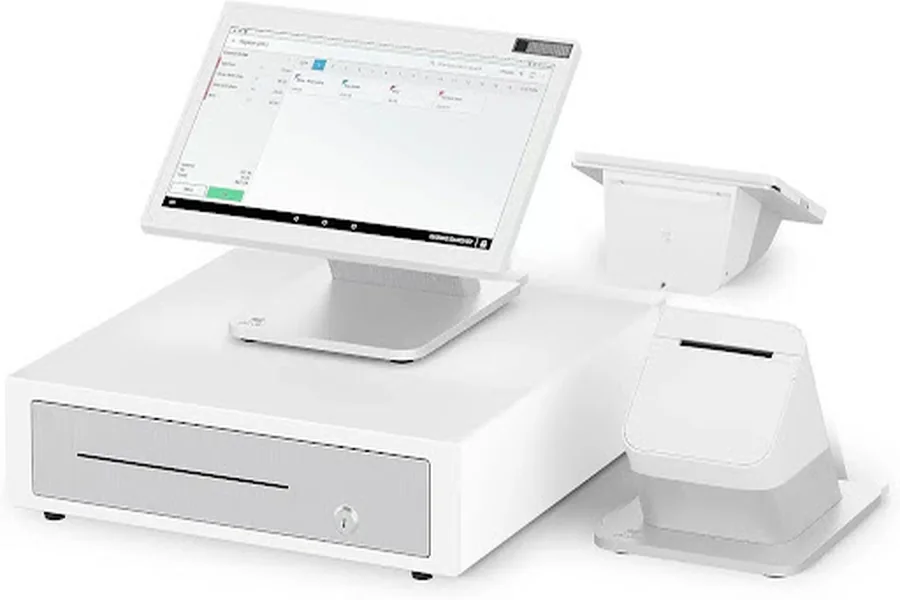
Pick the wrong register setup and you’re throwing money at the wrong problem for years. Restaurants live on margins, and every second counts during service. The choice between Clover Station Duo Equipment and the Station Solo isn’t just about screens—it’s about how your team moves, whether customers see what they’re paying for, and how fast you can flip tables. Let’s cut through the noise.
At a Glance: Head-to-Head Hardware Comparison
Duo brings a second screen. Solo keeps it simple. That one difference ripples through everything: customer experience, staff workflow, speed of service. If you’re running high volume—breakfast rush, dinner crush, happy hour chaos—the dual-screen setup changes the game. But if your operation is tighter, simpler, Solo punches above its weight.
Clover Station Duo vs. Solo: Spec Sheet Showdown
| Feature | Station Solo | Station Duo |
| Merchant Display | 14″ HD tiltable | 14″ 1920×1080 |
| Customer Display | None (integrated) | 7″ 1280×800 dedicated |
| Cameras | 1× 5MP | 2× 5MP |
| Receipt Printer | High-speed thermal | High-speed thermal |
| Payment Types | Chip, swipe, contactless | Chip, swipe, contactless (customer terminal) |
| Connectivity | Ethernet, WiFi, 4G LTE | Ethernet, WiFi, 4G LTE |
| USB Ports | 4 | Multiple |
| Operating System | Android (current) | Android 8.1–10 |
The Duo Advantage: Boosting Customer Experience & Efficiency
The second screen on the Duo isn’t fluff. It’s a separate real estate for your customers to see exactly what they’re buying, confirm totals, add tips, and sign off—all without staring at the merchant display. During dinner service, when your server’s pulling orders every 30 seconds, that dedicated screen eliminates the awkward moment where customers peer over at your terminal. It moves faster. Mistakes drop. Upsells happen naturally.
Why an Interactive Customer Display Screens is a Game-Changer
The customer-facing 7″ screen on the Duo does real work. Order confirmation—customers see exactly what they ordered before payment hits. Tipping—they make the choice on their own display, not crammed between your register and theirs. Loyalty program prompts show up automatically. Feedback collection happens in the moment, while they’re still engaged.
In practice: At 5:45 pm during Friday dinner rush, your server rings up a table of four. Instead of turning the register around or describing the total verbally, the customer sees it clearly on their screen. They tap their card, add a tip, and move. That transaction takes seconds longer than it should if you’re explaining everything. Multiply that by 200 covers, and you’ve just lost an hour of service speed.
The Duo also handles more complex customer interactions. Rewards balances display automatically. Split payments show clearly on the customer screen—no confusion. QR codes for contactless ordering or additional services print and display simultaneously. It’s not magic, but it’s operational efficiency that compounds.
A Complete Solution: The Full Clover Station Duo Equipment Package
When you go Duo, you’re not buying just a second screen. The full Clover Station Duo Equipment bundle includes the merchant terminal, the customer display, integrated receipt printer, and support for cash drawer connections. It’s a complete workstation. Nothing feels bolted on. Cables run behind counters, not across them. Your crew knows exactly where everything is.
Restaurants with 10+ registers? Duo scales cleanly. Training is simpler because the workflow is visible. New staff learn faster when they can see the customer’s screen update in real time. Managers spot issues faster too—if tipping is dropping, they see it on the customer display. If transactions are stuck, the dual screens make troubleshooting immediate.
The Solo Proposition: Power and Simplicity in One Package
Solo isn’t the “budget option.” It’s the focused option. Same processor firepower. Same payment acceptance. Same app ecosystem. What you lose is the second screen. What you gain is simplicity and a smaller footprint.
Key Hardware Features of the Station Solo
The Solo runs the same architecture as the Duo. 14″ HD tiltable display handles everything from orders to inventory to customer-facing prompts—just on one screen. The tilt matters. During payment, you rotate it toward the customer. They sign or approve. You rotate it back. It’s a physical workflow that works, especially in tight spaces.
Single 5MP camera handles receipts, IDs, and quick scans. Thermal printer keeps up with any volume. Four USB ports connect peripherals—scale, pin pad, label printer, whatever. Connectivity is solid: Ethernet for stability, WiFi for flexibility, 4G LTE for backup during internet hiccups.
The Solo isn’t slow or limited. It’s deliberate. If your operation doesn’t need a dedicated customer display—if staff and customers are already comfortable with the single-screen workflow—Solo delivers exactly what you need without extra cost.
When is the Clover Station Solo the Right Choice?
Tight counter space? Solo wins. Boutique coffee shops where three registers serve one bar—Solo fits. Food trucks, carts, kiosks. Small QSR locations with five to eight seats. Bakeries with one register. Wine bars. Solo doesn’t feel cramped; it feels purposeful.
Budget constraints at launch matter too. If you’re opening a second location or testing a new concept, Solo is the faster, cheaper way to prove the model before committing to a multi-screen setup across all sites.
Here’s the real signal: If your customers rarely wait at the register—if transactions are quick and straightforward—Solo handles it. If your operation is high-touch, high-volume, or relies on upselling and loyalty engagement at the point of sale, Duo earns its extra cost immediately.
Software & Ecosystem: A Shared Foundation of Power
Both devices run Clover’s operating system and access the same app marketplace. Your POS software, loyalty integrations, inventory sync, labor management—everything works identically on Solo or Duo. The choice isn’t about software capabilities; it’s about the physical interface.
Loyalty programs run the same way. Inventory updates hit both systems in real time. Third-party integrations—delivery services, accounting software, online ordering—they don’t care whether you’re using a single screen or dual screens. The backend is identical.
This matters strategically. If you start with Solo and later open a high-volume location, your staff already knows the Clover ecosystem. Switching to Duo isn’t retraining from scratch—it’s just learning a new screen layout. Apps you built or customized work unchanged. Data migrates cleanly.
Both support custom app development if you’re building internal tools. Both handle payment types identically: chip, swipe, contactless, and (on Duo) the tethered Mini for customer card entry. Both log transactions the same way, report the same data, and connect to the same settlement infrastructure.
The Verdict: Which Clover Station is Right for Your Business?
The hardware difference is clear. The business impact depends on your volume, space, and customer engagement strategy. Here’s how to decide.
Choose the Station Duo If…
- You’re running high-volume QSR or casual dining (20+ covers per hour per register)
- Upsells and loyalty programs drive margins—you need customer visibility
- Your team values speed and reduced friction during peak service
- You want a modern, professional setup that impresses customers and scales across multiple locations
- Tipping and feedback collection happen in real time at the point of sale
Choose the Station Solo If…
- Counter space is limited or you operate in a compact environment
- Your transaction flow is straightforward (order, pay, go)
- You’re managing single-location or low-volume operations
- Budget is a critical factor and you need reliable, no-nonsense hardware
- Your staff and customers are already comfortable with single-screen workflows
Frequently Asked Questions (FAQ)
Can I upgrade from a Solo to a Duo later?
Yes. Your data, apps, and settings migrate. It’s not seamless hardware-wise (you’ll need new mounting and cabling), but software transitions cleanly. Plan for a few hours of downtime during the swap.
Do both models use the same software and apps?
Completely. The app marketplace, integrations, and backend are identical. Loyalty, inventory, reporting—no differences. You’re only choosing hardware form factor.
What peripherals are compatible with both stations?
Both support standard POS peripherals: cash drawers, additional printers, scales, barcode scanners, and pin pads. Check Clover’s compatibility list for specifics, but the ecosystem is broad and well-documented.